You Cannot Afford To Skip This
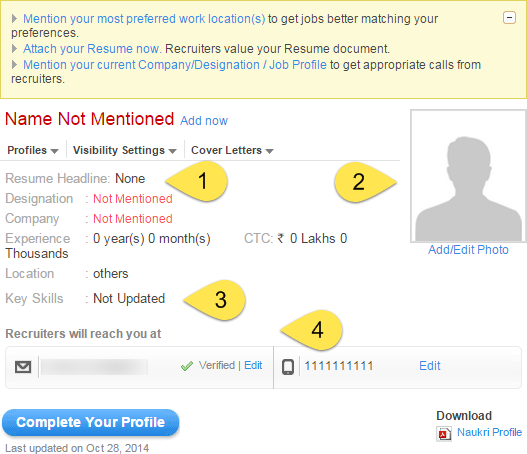
This is a brand new account that I created on Naukri. In the coming screenshots you will see bullets as seen above. Every bullet has some text, you will find after the screenshot. Make sure you read them and follow the instructions.
Since it is a new account and a new profile, it is pretty much empty. It is our job to fill every single field in the profile to maximize the resume visibility for the recruiters to see. If the profile is filled up, the algorithms will favor your resume of this profile over other incomplete profiles.
Figure 1:
- Resume Headline: Make sure you have a meaningful headline for your resume. I am creating a profile focusing on the job title ‘.NET Developer’ for this walkthrough. .NET Developer would be my resume title for this profile.
- Photo: Make sure you use the most recent picture of you and you should be well groomed in the picture! Name the picture firstname_lastname_job_title.png or firstname_lastname_degree.png.
- Key Skills: Since you are a fresher with no work experience to put in your resume, it is very important you enter all the key skills related to your targeted job title. In my case it would be C#, LINQ, MS SQL, MVC, WPF, ASP.NET, jQuery, Entity Framework. It will be a combination some of some of these and other skills. I have listed the above as an example.
- Verified Account: Make sure you have verified the email you have used to create the Naukri account.
Next Lesson : Profile Completeness
Previous Lesson : Job Search & Profiles